DataViews
A dataview is a useful component in Cavaliba to improve access to relevant information.
It enables data administrators to create predefined views of Schemas and objects. These predefined views contain subsets of fields from a Schema. Users can select a dataview from a list in the Web UI for faster access to the data they need.
You can define multiple DataViews per Schema for different types of users or different needs.
For example, a site Schema describing various locations, headquarters, facilities, factories, buildings for a company, could use an Address dataview which would display only the relevant fields for postal/address such as City, Zipcode, Street, Country. Other dataviews for the same Schema could present Organization, Key Figures, Activities, etc.
DataView objects
DataViews are implemented as a special builtin Schema and can thus be managed from the Web UI, REST API, console CLI, import/export, etc.
Create a Dataview
- classname: _dataview
  keyname: site_postal
  target_class: site
  displayname: MySiteView_postal
  description: This View displays Geographical information about sites
  content: |
    columns:
      - SiteName:
          from: keyname
      - Address:
          from: address
      - zipcode
      - city
      - country
      - ISO
           from: country__iso
This configuration will create a dataview named site_postal for the (target_class) site.
The from option defines a source field which provides content for that column. An invalid from value will create an empty column. The intended use of the column/from pattern is to provide a way to supply nicer (custom, translated, compact, …) column names to users.
Use a dataview
In the Web UI, the dataview selector is next to the Action button.
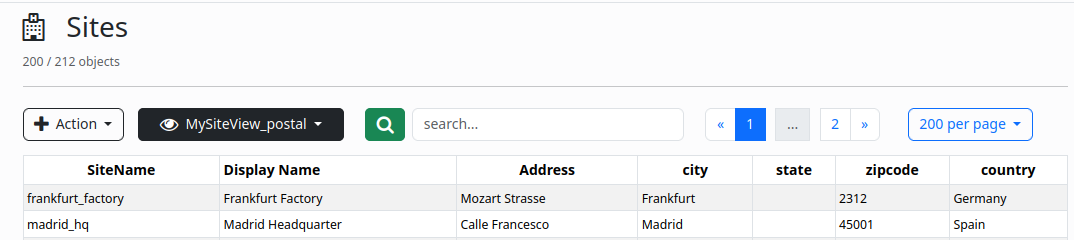
Default dataview
A schema without any associated dataviews will present default information in the Web UI, comprising keyname, displayname and last_update. This is not very useful.
You should create a default dataview for each Schema to present more relevant information by default.
By design, a default dataview is named with the schema name with a _default suffix.
Example (from the builtin Sirene Notification Application):
- classname: _dataview
  keyname: sirene_template_default
  target_class: sirene_template
  displayname: Default
  is_enabled: True
  description: Default DataView for Sirene Templates
  content: |
    columns:
       - keyname
       - displayname
       - Category:
            from: category
       - Severity:
            from: severity
       - Hint:
            from: hint